
How to Migrate Notion & Obsidian Prompts to a Local IDE
About Author

Ivica is the creator of LeanPrompts Studio, focused on building high-performance web experiences and elegant local-first tooling.
Key Takeaway: Storing valuable prompt collections in static apps like Notion, Obsidian, or Google Docs creates passive text graveyards where finding, editing, and copy-pasting prompts wastes hours every week. The native Universal Import Wizard in LeanPrompts Studio migrates markdown files, folders, and CSV databases into an active browser IDE in under 45 seconds, generating dynamic form interfaces, preserving code fences, and securing data inside local browser memory.
Upgrade Your Prompt Library with LeanPrompts Studio
Migrate your prompt archives into a private browser IDE. The Universal Import Wizard in LeanPrompts Studio converts static notes into active templates with dynamic forms, code-fence protection, and zero data leaks.
“Keeping your prompts in a static note-taking app like Notion or Obsidian is like storing high-performance racing tools inside cardboard boxes in a locked basement: every time you need to tune an engine, you must leave the garage, search through dusty shelves, unbox the wrench, and walk back up. A local prompt IDE brings the entire tool chest directly next to your active vehicle, rendering dynamic input forms, attaching reference files, and firing prompts straight into your AI chat in a single keystroke.”
Quick Concept Check (Mini-Glossary):
- PKM (Personal Knowledge Management): The practice of capturing, organizing, and retrieving individual digital notes and intellectual assets.
- Prompt Drift: The silent, unmonitored degradation of prompt performance caused by accidental manual edits or copy-paste omissions.
- Code-Fence Awareness: A parser state machine that prevents splitting or modifying text located inside active code blocks (fenced markdown code blocks).
- Atomic Rollback: A database safety mechanism that tags an import batch under a single session ID, allowing you to delete every imported item with one click if needed.
Why Static Note Archives Paralyze Prompt Workflows:
🔴 Before (The Passive Notion & Obsidian Copy-Paste Shuffle):
“You open Notion in Tab 1, search through a 200-row database for a coding prompt, copy the raw text, switch to ChatGPT in Tab 2, paste it in, manually scroll through 40 lines of text to replace[INSERT_LANGUAGE]and[INSERT_FRAMEWORK], and then drag in a reference PDF for the tenth time today.”
(3 minutes wasted per prompt run, high cognitive fatigue, frequent syntax errors, and zero version history).🟢 After (LeanPrompts Studio Active Command Center):
“You pressCtrl+Kdirectly alongside your active chat to find the prompt instantly. The Studio auto-generates sidebar inputs and dropdown menus for{{Language}}and{{Framework}}, retains your last-used file dropzone, and injects the compiled text and attachments in one click.”
(Zero manual bracket editing, 4 seconds to execute, 100% private in local IndexedDB).
1. The Real Cost of the “Prompt Graveyard” in Modern AI Workflows
Prompt engineering has evolved from casual one-line questions into complex, multi-stage software systems. Developers, technical writers, and researchers routinely build comprehensive prompt templates containing complex system personas, output schema guardrails, and dynamic variables.
Yet, the vast majority of professionals manage these mission-critical assets in passive documentation tools: Notion databases, Obsidian markdown vaults, Apple Notes, or spreadsheets.
According to foundational cognitive architecture research published in Cognitive Science (Sweller, 1988), human working memory is severely constrained when forced to manage extraneous cognitive load. Switching between browser tabs, hunting down bracketed variables inside text blocks, and manually re-uploading the same reference files creates constant context-switching drag that interrupts engineering focus.
┌─────────────────────────────────┐      ┌─────────────────────────────────┐
│     PASSIVE NOTE GRAVEYARDS     │      │   ACTIVE LOCAL PROMPT STUDIO    │
│  (Notion, Obsidian, Docs, CSV)  │      │       (LeanPrompts Studio)      │
├─────────────────────────────────┤      ├─────────────────────────────────┤
│ • Static, unexecutable text     │      │ • Dynamic form GUI generated    │
│ • Manual bracket editing in chat│ ───► │ • Direct DOM chat injection     │
│ • Unlinked, flat file clutter   │      │ • Visual Git diffs & snapshots  │
│ • 45s copy-paste friction       │      │ • 4s keystroke execution        │
└─────────────────────────────────┘      └─────────────────────────────────┘
While note-taking apps excel at long-form writing and interlinked knowledge graphs, they fail as prompt execution environments because text in a document is dead text. It cannot auto-populate UI dropdowns, it cannot programmatically beam files into web chat textareas via synthetic DOM events, and it cannot protect your templates from accidental overwrites.
Real-World Case Study: Escaping the 300-Prompt Notion Quagmire
Examining an authentic developer scenario illustrates how manual prompt archives throttle productivity:
The Situation & Challenge
An independent full-stack developer maintained a curated library of 280 prompt templates in a Notion database. The collection spanned code-review checklists, SQL migration generators, API contract validators, and B2B cold-email templates. Every prompt was carefully tagged by language and framework.
The Legacy Dilemma (Manual Copying vs. Lost Taxonomy)
The developer encountered two severe bottlenecks:
- The Daily Execution Tax: Every time the developer needed to run an API schema audit, they had to open Notion, wait 4 seconds for the database view to hydrate, search for the prompt, copy the text, paste it into Claude, and spend 90 seconds manually replacing placeholders like
[TABLE_NAME]and[SCHEMA_DDL]. Across 15 daily AI interactions, this consumed over 30 minutes of deep-work time every day. - The Migration Dread (3.5 Hours of Manual Work): When the developer discovered LeanPrompts Studio, the thought of manually migrating 280 prompts (creating 280 new prompts, copying 280 titles, pasting 280 contents, and re-typing tags) represented an exhausting 3.5-hour manual slog. As a result, they stayed stuck in Notion.
The LeanPrompts Solution
Using the Universal External Import Wizard in LeanPrompts Studio:
- The developer exported their Notion database as a standard Markdown & CSV zip archive.
- In LeanPrompts Studio, they opened the Import Wizard from the Library panel, dropped the unzipped folder into the dropzone, and selected
1 File = 1 Prompt (Safe Default). - In 8 seconds, the engine parsed all 280 files: it automatically stripped Notion’s 32-character hexadecimal filename hashes, extracted existing tags, protected Python and JavaScript code fences from accidental splitting, and flagged 12 duplicate templates.
- With a single click, all 280 prompts were committed to local IndexedDB under a unique rollback session ID.
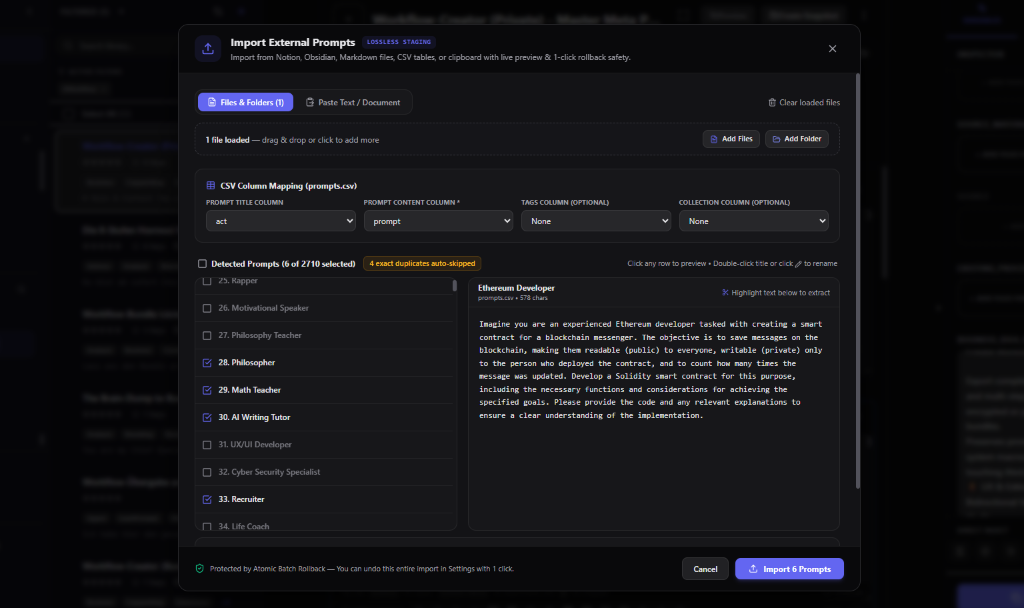
The developer completed the entire migration in under 45 seconds, turning a dormant archive into an active browser-based command center.
2. Track A: The Web-Chat Traditionalist (Friction-Free Browser Flow)
For professionals who run their daily workflows inside native browser interfaces like ChatGPT, Claude, or Google Gemini, LeanPrompts Studio functions as an intelligent execution overlay.
Instead of writing out long, repetitive context prompts every time you switch tasks, the LeanPrompts extension provides a dedicated in-chat workspace:
- Press
Ctrl+Kto search across all your imported prompts in milliseconds. - Prompts auto-generate interactive input fields for variables (
{{Topic}}), dropdown menus, and binary file dropzones. - Global reusable snippets (
@CodeStandards) update modular instructions across every template simultaneously. - Single-click injection fires your compiled text directly into the chat prompt area without touching the clipboard.
The Studio preserves your prompt logic with zero premature mutation. It leaves your code examples, JSON blocks, and legacy placeholders intact during ingestion, allowing the Studio’s native syntax scanner to handle on-demand conversions when you open the prompt in the editor.
3. Track B: The Local-First Solo Developer (Local AI & Absolute Privacy)
For developers handling proprietary database schemas, patented algorithms, or confidential client code, public cloud AI tools represent an unacceptable security liability. According to international information security standards documented in ISO/IEC 27001:2022 (Information Security Management), storing corporate intellectual property on unvetted third-party cloud databases violates basic access controls.
Uploading internal prompts, secret API keys, or private customer meeting transcripts to cloud-based prompt management tools creates severe data governance risks.
LeanPrompts Studio executes 100% locally inside your browser’s private IndexedDB sandbox:
- Zero Cloud Data Exfiltration: Your imported prompts, folder structures, and variable presets remain strictly inside your physical machine’s local RAM and browser storage.
- Local Model Orchestration: Connects seamlessly to offline open-source LLMs via Ollama running compact local models (7B-14B parameter class) on consumer workstation hardware over private localhost connections.
- Zero API Metering Costs: Import and execute thousands of complex prompt templates without paying recurring monthly cloud API subscription fees.
4. Quantitative Comparative Framework
| Feature & Dimension | Static Note Apps (Notion / Obsidian) | Cloud SaaS Prompt Tools | LeanPrompts Studio Import Wizard |
|---|---|---|---|
| Execution Latency | 45 to 90 seconds (search, copy, tab-switch, paste). | 15 to 25 seconds (web dashboard copy-paste). | 3 to 5 seconds (direct in-chat injection via Ctrl+K). |
| Data Sovereignty & Privacy | High (local Obsidian); Medium (cloud-hosted Notion). | Critical Hazard; stores prompts on startup cloud databases. | 100% Local-First; stored in browser IndexedDB sandbox. |
| Variable & Form Generation | None; manual bracket editing inside chat textareas. | Basic text fields; no native file dropzones. | Zero-Touch Forms; inputs, dropdowns, and file dropzones. |
| Batch Migration Velocity | 3.5+ hours for 250 prompts (manual copy-paste). | Manual CSV upload with frequent formatting errors. | 45 seconds; automated folder, markdown, and CSV ingestion. |
| Rollback Safety | None; manual cleanup required if import fails. | Irreversible; corrupts existing cloud library. | 1-Click Atomic Rollback; purges batches cleanly via session ID. |
Frequently Asked Questions (Prompt Migration)
Why shouldn’t I keep managing my prompt library in Notion or Obsidian?
Notion and Obsidian are passive note-taking apps, not prompt execution environments. They cannot generate dynamic sidebar forms, they cannot attach binary files into web chat interfaces, and finding prompts requires constant tab-switching. LeanPrompts Studio acts as an active IDE directly alongside your AI chat.
How does the importer prevent destroying code blocks and JSON inside my prompts?
The ingestion engine uses a fence-aware parsing state machine. It tracks markdown code fences (``` and ~~~) line-by-line, strictly preventing document splitting on headers (#) or horizontal rules (---) that appear inside code blocks or JSON payloads.
Can I safely import confidential company prompts and proprietary system instructions?
Yes. LeanPrompts Studio is built on a 100% local-first architecture. When you drag and drop files into the Import Wizard, parsing occurs entirely within your browser’s local RAM via the HTML5 File API and commits directly to IndexedDB with zero cloud transmission.
What happens if an import contains messy formatting or duplicates?
The Import Wizard features a Staged Review Modal with content previews and SHA-256 duplicate detection against your existing library. Furthermore, you can execute a 1-click Rollback in Settings at any time to purge imported batches cleanly.
Will this migration workflow work with local AI models like Ollama?
Yes. LeanPrompts Studio supports direct integration with local localhost endpoints including Ollama and LM Studio. Once your prompt library is imported, you can trigger injections into local models running compact 7B-14B architectures offline.
Ready to Upgrade Your Prompt Workflow?
Install LeanPrompts Studio directly from the Chrome Web Store and turn your passive note archives into an active, local-first prompt IDE today.
References
- Cognitive Load Theory & Working Memory Constraints: Sweller, J. (1988). Cognitive load during problem solving: Effects on learning. Cognitive Science, 12(2), 257–285. https://doi.org/10.1207/s15516709cog1202_4.
- Personal Knowledge Management (PKM) Architecture: Schiller, M. (2017). Review of How to Take Smart Notes by Sönke Ahrens. Journal of Writing Research, 9(2), 227–231. https://doi.org/10.17239/jowr-2017.09.02.05.
- Information Security Management Systems (ISO 27001): International Organization for Standardization. (2022). ISO/IEC 27001:2022: Information security, cybersecurity and privacy protection: Information security management systems. https://www.iso.org/standard/27001.
Related Articles
Local Zettelkasten: Atomic Notes in Markdown Vaults
Transform chaotic scratchpads into atomic Markdown Zettel notes with bidirectional wikilinks locally without cloud data leakage. Install the free workflow.
First-Principles Knowledge Tree: Axiom Reduction System
Deconstruct complex technical problems into core axioms, build semantic knowledge trees, and accelerate learning using local-first prompt chains.
Journal-Hop Realignment Chain: Reframe Rejected Manuscripts
Audit journal scope mismatches, re-triage abstract rhetoric via Swales CARS moves, and draft targeted cover letters locally without cloud data leaks. Free 1-click import.