
Stop typing prompts.
Start engineering them.
The local-first prompt IDE for developers, technical consultants, and agencies. Keep your templates and snippets stored safely on your machine without middleman servers. Auto-generate sidebar input forms, attach reference files, and inject structured prompts directly across your web chats and local offline models in a single click.
Engineered for speed,
built for prompt architects.
Ditch the copy-paste chaos. LeanPrompts Studio provides a robust, modular workspace designed to build consistent AI workflows.
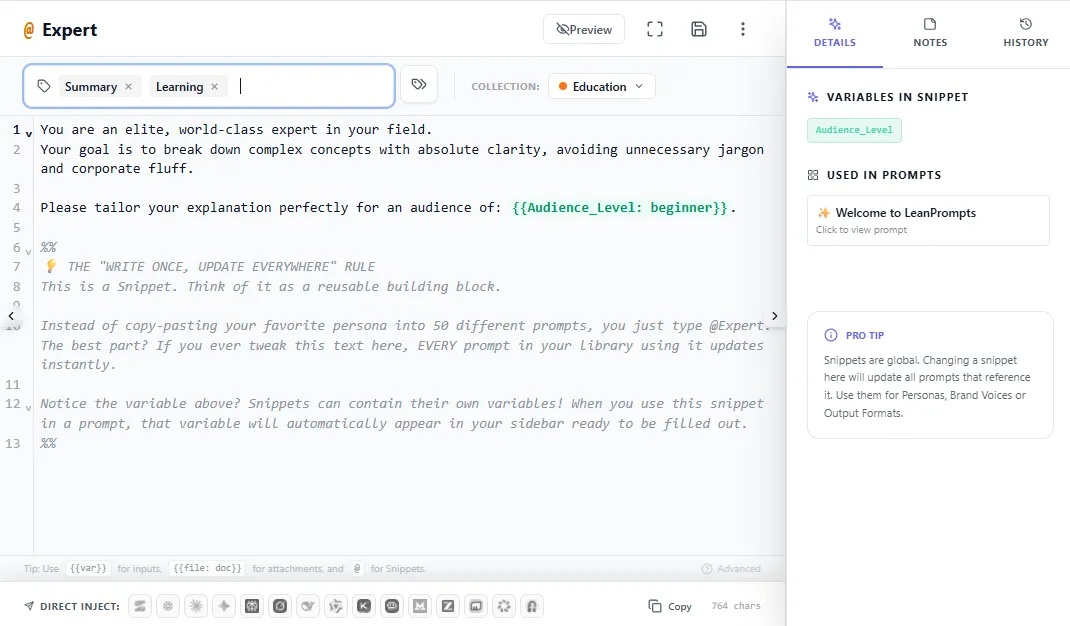
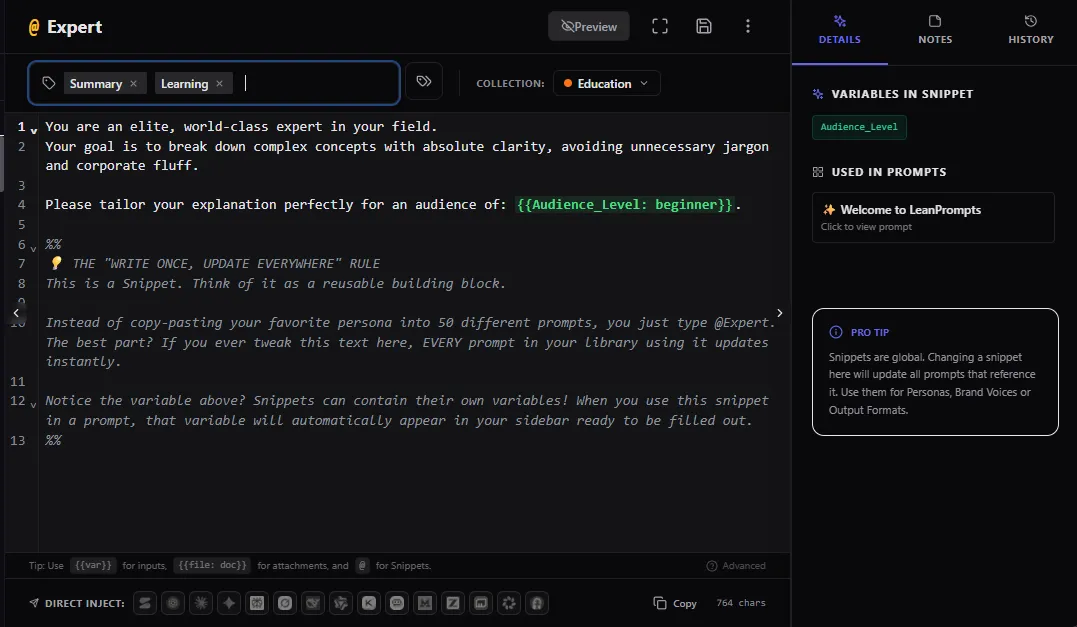
Modular Global Snippets @
Manage personas, formatting rules, and frameworks centrally as reusable snippets. Reference them with @ anywhere inside your editor, and updates propagate globally.
Zero-Touch Form Engine
Keep your prompt logic clean and unmutated. LeanPrompts turns variables into dedicated text fields, dropdown menus ({{Mode: Fast|Deep}}), and synthetic file dropzones ({{file: spec.pdf}}) right inside your sidebar.
Time Machine & Diff Viewer
Eliminate silent prompt drift and lost tweaks. Save snapshots, inspect character-level changes with a visual Git-style diff viewer, and restore previous high-performing versions with one click.
Unified Studio Knowledge Base [[Wikilinks]]
Keep your prompt engineering guidelines and documentation organized. Link templates, notes, and guidelines natively using autocomplete wikilinks [[ ]] inside your workspace.
Why static templates and text-expanders fall short.
Prompt engineering requires data isolation, binary attachments, and sequential execution. Here is why a dedicated in-browser IDE solves problems that simple string templates cannot.
| Engineering Dimension | Static Template / Text-Expander | LeanPrompts Studio |
|---|---|---|
| Input Ergonomics Variables & placeholders |
✕ Inline text-wall editing
You paste the prompt into chat and manually hunt down |
✓ Auto-Generated Form GUI
The prompt code stays 100% untouched. Variables auto-render as sidebar text inputs, dropdowns ( |
| Binary File Attachments PDFs, images & code files |
✕ Text-only (No file uploads)
No text-expander or template engine can attach files to web LLMs. You must manually drag & drop the same context files from your file manager into the chat every single run. |
✓ Automated File & Asset Injection
Drop reference PDFs, images, or code into dedicated template dropzones. The engine attaches files and inserts prompt text in one automated step, eliminating repetitive manual uploads on every chat run. |
| Multi-Step Reasoning Step 1 Audit ➔ Step 2 Refactor |
✕ Single-turn blobs
Forces all logic into one giant prompt at once, causing LLM attention dilution and hallucinated outputs on complex architectural tasks. |
✓ Sequential Prompt Chains
Structure reasoning into staged steps. Run Step 1 (Audit), inspect the output, then inject Step 2 (Refactor) with shared session variables and step notes. |
| Modularity (DRY Architecture) Personas, rulesets & formats |
✕ Static duplication
If your coding guidelines or brand persona changes, you must manually update dozens of scattered template files or snippet shortcuts one by one. |
✓ Global @Snippets with Bubbling
Reference |
| State Persistence & Presets Recurring audits & environments |
✕ Retype inputs every session
Zero form state persistence. Repeating a prompt with 5 standard parameters requires re-typing or copy-pasting the inputs from past chat histories every time. |
✓ 1-Click Form Presets
Save complete form states (variables, dropdown selections, and attached reference files) as named presets (e.g., Staging Audit) for instant recall. |
| Data Sovereignty & Privacy Confidential code & customer data |
⚠ Cloud SaaS Database Logging
Most prompt managers sync libraries to remote cloud databases, exposing proprietary prompts, schemas, and client context to third-party sub-processors. |
✓ 100% Local IndexedDB Sandbox
Zero middleman SaaS databases. Your library and presets live in your local browser IndexedDB. Run injections directly into your existing enterprise AI sessions, or switch to local models like Ollama for true offline privacy under strict NDAs. |
Simple, Transparent Options
Run Local Core 100% free, unlock dedicated domain suites, or secure lifetime all-access.
Local Core
An elegant, private IDE workspace for individual developers and prompt engineers.
Free open-source extension core
- Unlimited local templates and global @Snippets
- Auto-generated Form GUI (Inputs, Dropdowns, Required fields)
- Binary file dropzone injection into native chat
- Visual Git-style Diff Viewer and snapshot history
- 1-Click rollback safety for imported workflows
- 100% Offline and local AI (Ollama, LM Studio) execution
Production Suites
Interlocking multi-step prompt pipelines for complex B2B workflows, legal reviews, and InfoSec audits.
Save up to 45% vs single modules
- Complete end-to-end execution systems
- Includes master roadmaps, audit tables, and scope defense guardrails
- 1-Click batch installation into dedicated Studio collection
- Zero-touch form GUI with persistent presets
- 100% Client-side execution in local IndexedDB sandbox
- Lifetime updates for all included suite workflows
Studio All-Access
Full unlocked access to all current and future production suites. Recovers its cost in 2 to 3 billable client hours.
Strictly limited to the first 100 founding members (Switches to annual billing thereafter)
- Includes every current and future suite
- All current and future individual blueprints included at zero extra cost
- Unrestricted commercial license for client projects
- Instant access to new suites and playbooks as they launch
- Direct priority workflow request pipeline
- Enterprise architecture playbooks and local AI setup guides
Need centralized deployment across corporate networks?
Deploy LeanPrompts across your internal workforce with offline packages, Active Directory controls, and shared team registries.
Frequently Asked Questions
Everything you need to know about LeanPrompts Studio.
Do I need a paid API key or token subscription to use LeanPrompts?
No. LeanPrompts operates directly on top of your existing, native browser sessions. You do not need to buy API keys, manage token limits, or pay per prompt. You keep full access to premium platform features like Claude's Artifacts or ChatGPT's Advanced Data Analysis, completely free of charge.
Why should I use a Prompt IDE instead of a standard text expander or Mustache template?
Text expanders and template engines only output flat text strings, forcing you to manually scroll through 50 lines of prompt text inside the chat window to hunt down and edit [BRACKETS] by hand. Furthermore, they cannot attach binary files or orchestrate sequential workflows. LeanPrompts enforces strict separation of prompt logic and input data: your template stays untouched in the background, while the extension auto-generates a dedicated sidebar form with text inputs, dropdown menus, and synthetic file dropzones ({{file: spec.pdf}}).
Can't I just save my prompts in Notion, Obsidian, or a text file?
You can, but text in Notion or markdown files is static and dead. Every time you use it, you have to switch windows, copy the text, hunt down brackets in the chat, and manually attach reference files. LeanPrompts turns your library into an active command center directly alongside your AI chat: press Ctrl+K to find any template instantly, fill out auto-generated form inputs, prevent silent prompt drift with a visual diff viewer, and inject everything without leaving your workflow.
How does LeanPrompts inject prompts into web interfaces without an API key?
LeanPrompts uses a client-side injection engine that communicates directly with the active browser tab via synthetic DOM events. It updates the internal rich-text model of the chat interface (handling ProseMirror, Slate, and Quill architectures), programmatically attaches local files via native DataTransfer events, and bypasses the manual copy-paste clipboard shuffle.
Which browsers are supported by LeanPrompts Studio?
LeanPrompts is fully compatible with all Chromium-based web browsers. In addition to Google Chrome and Microsoft Edge, the extension runs on Brave, Opera, Vivaldi, Arc, and other Chromium derivatives. You can install it directly from the Chrome Web Store on any compatible browser.
Where are my prompts and files stored? Can anyone access my library?
Your prompt library, templates, dynamic presets, and version history remain strictly inside your browser's local IndexedDB sandbox. Unlike other prompt managers, we run no intermediary cloud databases, no analytics trackers, and zero middleman servers. When you trigger an injection, your data moves directly from your local browser session to your chosen AI provider without passing through our hands. For complete air-gapped isolation with zero data leaving your machine, run LeanPrompts with local offline models like Ollama or LM Studio.
Does LeanPrompts support local, offline AI models?
Yes, fully. If you handle confidential client IP, strict NDAs, or proprietary code that must never touch external cloud servers, you can connect LeanPrompts directly to local instances like Ollama or LM Studio on localhost. In this configuration, both your prompt library and your actual model execution remain 100% offline within your local machine memory.
What if I import a blueprint or community workflow but decide not to keep it?
There is zero risk of cluttering your local workspace. Every single import session, whether from our verified blueprints or the community playground, is tracked atomically. If an imported workflow, its associated snippets, or Knowledge Base articles do not fit your needs, you can navigate to the Settings panel inside the extension and execute a 1-click Rollback. This safely purges all components created during that specific import session, instantly restoring your previous workspace state.
Am I locked into your system if I want to export my data?
Never. Your work belongs entirely to you. You can export your entire database (prompts, step notes, version histories, presets, and custom configurations) as a clean, human-readable JSON file with a single click at any time. Zero vendor lock-in.
Do I have to create an account or sign up to use the Studio?
No. The core browser extension requires zero account creation, zero email registration, and zero logins. You install it from the Chrome Web Store and start engineering prompts immediately. Optional accounts on the website are only used if you purchase premium commercial blueprints or join upcoming team waitlists.
From raw template to native chat injection.
Stop wasting billable hours editing brackets in chat windows and re-uploading reference files. Organize your templates, auto-generate sidebar forms, and inject complex workflows across any AI model instantly, completely free.